
Globes
Anything previously located in the Globes across the top of the screen...

... is now located in the lefthand menu.
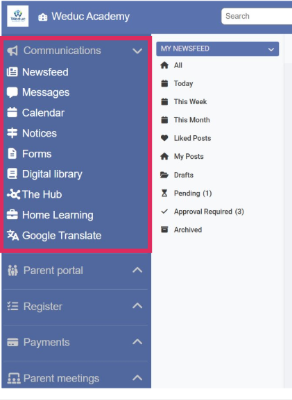
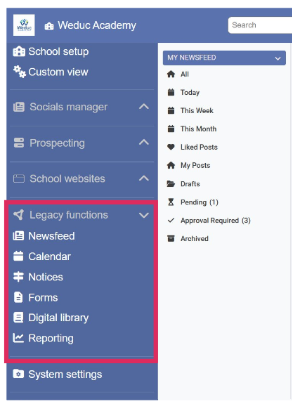
School View MAT View
For the majority of school users who will have the “School View” this will be at the very top of the menu, under “Communications.” For those using the “MAT view” (Eg. Trust Central Teams) this will be found further down the left-hand menu under “Legacy functions.”
Some of the old globes, such as “Parent Meetings” and “Payments”, have their own section on the left-hand menu. Similarly, you will notice some areas from the old system settings, previously accessed via the top right hand drop down, also have their own section on this menu. For example, “Absence reporting”, “Registers” and “Reports”.
System Settings
Previously, settings were accessed by clicking on your school settings tab in the right-hand drop-down menu.
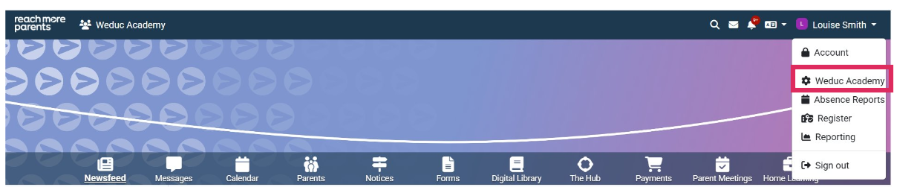
This would then bring up a new page...
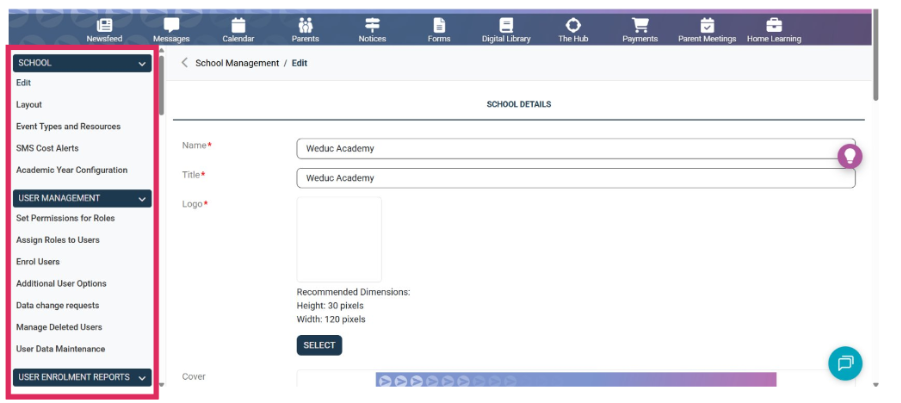
... with a scrollable menu on the left-hand side.
System settings are now located at the bottom of the left-hand menu.
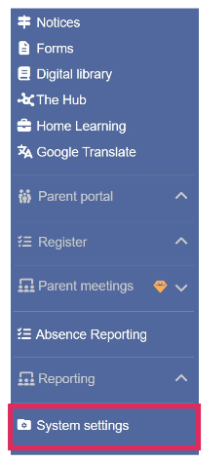
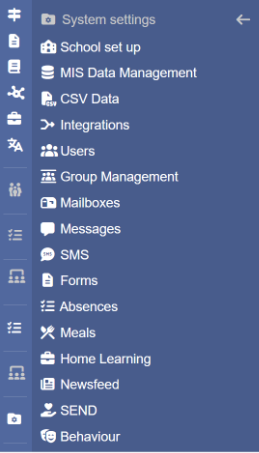
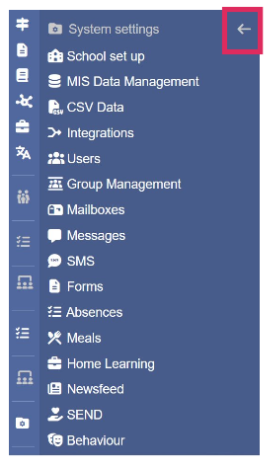
System settings tab Submenu Back arrow
Clicking on this will open a sub-menu. From here you can access the settings for these areas of the product. Clicking the left-pointing arrow at the top of the submenu will close System Settings.
Appendices
‘Where has it moved?’ reference table
|
Looking for... |
Find it here... |
|
Absence Reporting |
Absence Reporting (Own section on left-hand menu) |
|
Academic Year Configuration |
System Settings > School Setup |
|
Additional User Options |
System Settings > Users |
|
Analytics |
System Settings > Integrations |
|
Appearance Settings |
System Settings > School Setup |
|
Assign Roles to Users |
System Settings > Users |
|
Audit Logs |
Reporting (Own section on left-hand menu) |
|
Balance Adjustments |
System Settings > Meals |
|
Calendar |
Communications > Calendar |
|
CSV Upload Structure |
System Settings > CSV Data |
|
Parent Meetings Settings |
Parent Meetings > Custom Settings |
|
Data Change Requests |
System Settings > Users |
|
Event Types & Resources |
System Settings > School Setup |
|
Forms |
Communications > Forms |
|
Form Settings |
System Settings > Forms |
|
Group Management |
System Settings > Users |
|
Help |
Help button (? In top right hand corner of screen) |
|
Home Learning |
Home Learning (Own section on left-hand menu) |
|
Homework Settings |
System Settings > Home Learning |
|
Integrations |
System Settings > Integrations |
|
Mailboxes |
System Settings > Messages |
|
Manage Deleted Users |
System Settings > Users |
|
Manage Events |
Parent Meetings > Manage Events |
|
Message Settings |
System Settings > Messages |
|
Message Templates |
System Settings > Messages |
|
Messages |
Communications > Messages |
|
MIS Configuration |
System Settings > MIS Data Management |
|
MIS Sync Tasks |
System Settings > MIS Data Management |
|
MIS Task History |
System Settings > MIS Data Management |
|
My Events |
Parent Meetings > My Events |
|
Newsfeed |
Communications > Newsfeed |
|
Newsfeed Management |
System Settings > Newsfeed |
|
Notices |
Communications > Notices |
|
Product Updates |
Product update button (star in top right hand corner) |
|
Reports |
Reporting (Own section on left-hand menu) |
|
Registers |
Register (Own section on left-hand menu) |