
Enhancements
Free School Meals (FSM) – Meal Manager
Applies only to schools using the Meal Manager module, for both Wonde and SIMS MIS setups
FSM eligibility data will be now be pulled from your MIS into ReachMoreParents, reducing manual setup and ensuring the data in Meal Manager always stays up to date. This keeps your FSM data accurate in Meal Manager by matching eligibility with your school’s MIS records.
Benefit for schools
This enhancement reduces manual input, keeps data accurate, and ensures FSM eligibility in ReachMoreParents always matches the school’s MIS records.
Setup note:
Applies only to schools using the Meal Manager module.
FSM data will not be imported for schools that do not use Meal Manager.
FAQs
SEND Codes – PEMS and Automated Groups
Applies to Wonde schools only - this update brings Wonde schools in line with SIMS schools, which already have this functionality.
SEND codes (E and K) will now be pulled directly from your MIS into ReachMoreParents, provided the sync is enabled in both Wonde and within ReachMoreParents.
Once enabled, SEND codes will:
- Display directly against each pupil’s SEND record in ReachMoreParents.
- Be available within PEMS (Parents Evening Management System) to support event creation and appointment booking.
- Populate SEND Automated Groups, helping schools target messages, notices, and content directly to parents of SEND pupils.
Benefit for schools
This enhancement reduces manual input, keeps data accurate, and ensures SEND codes (E and K) in ReachMoreParents always match your MIS records.
Setup guidance
To enable this feature:
- Schools must first enable the “Student SEN Read” permission in Wonde.
- Follow guidance (to be released shortly after the update) on how to configure the MIS syncs within ReachMoreParents.
FAQs
Which schools does this apply to?
This update applies to Wonde schools only and brings them in line with SIMS schools, which already have this functionality.
What’s changing?
SEND codes (E and K) will now be pulled directly from your MIS into ReachMoreParents, provided the sync is enabled in both Wonde and within ReachMoreParents.
Will manual SEND entries be affected?
Yes. Any SEND data that has been manually entered in ReachMoreParents will be overwritten when the MIS sync runs.
The MIS should always be treated as the source of truth for SEND information.
What will SEND codes be used for?
SEND codes will:
- Display directly against each pupil’s SEND record in ReachMoreParents.
- Be available within PEMS (Parents Evening Management System) to support event creation and appointment booking.
- Populate SEND Automated Groups, helping schools target messages, notices, and content directly to parents of SEND pupils.
What are the benefits?
This automation reduces manual input, keeps data accurate, and ensures SEND codes (E and K) in ReachMoreParents always match the school’s MIS records.
Support Article
Primary Carer Logic – iSAMS via Wonde
Applies to iSAMS schools only
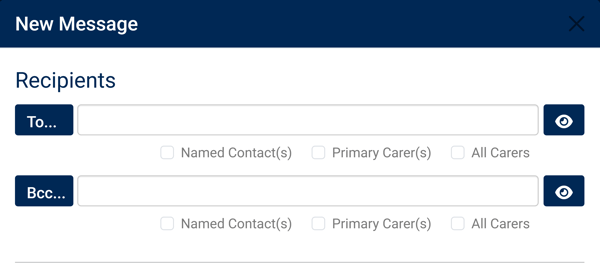
Any parent or carer with “Parental Responsibility” ticked in iSAMS will now automatically be treated as a Primary Carer in ReachMoreParents.
This ensures messages to “Primary Carers” always reach at least one parent or carer with parental responsibility.
Once live, both the Primary Carer(s) and All Carers checkbox options will send messages to the same group of parental contacts.
FAQs
Which schools does this apply to?
This change applies to iSAMS schools only.
What’s changing?
Any parent or carer with “Parental Responsibility” ticked in iSAMS will now automatically be treated as a Primary Carer in ReachMoreParents.
Why is this important?
This change resolves a limitation within iSAMS, which does not include a dedicated “Primary Carer” field. Instead, iSAMS assigns an order based on when parents are added to the system, and shared parental records do not include an order at all.
As a result, some pupils previously had no designated primary contact, which could prevent messages from being delivered.
The new logic ensures that messages to “Primary Carers” in ReachMoreParents will always reach at least one parent or carer with parental responsibility, removing this inconsistency.